
<class 'builtin_function_or_method'>
<class 'builtin_function_or_method'>
<class 'function'>Python bindings to compiled languages
Mikolaj A. Kowalski
2026-07-14
Scope of the course
What this course will not teach you:
- How to properly bind compiled (C++/Fortran) code to Python
- The topic is too broad to be covered in 1.5h session
- If you are quick enough you can still make it to Testing (part 1)!
What this course will teach you:
- Give a ‘taste’ of how binding compiled code looks like
- Showcase some things you can achieve with it
- Give some examples that can be good starting point for further study
Prerequisites
In the course we will assume:
- You are familiar and comfortable with Python
- You have some prior experience with C/C++
- Enough to read and write simple functions
- Use
std::vector,std::string,std::function - Have seen lambda expressions before e.g.
[](int x){return x*x;}
Show of hands
- How many of you have written a compiled code coupled to Python?
- How many of you have run a compiled code in Python?
Preliminaries
This deck of slides is available online:
https://cambridge-iccs.github.io/python-bindings-summer-school-2026/
GitHub repository:
https://github.com/Cambridge-ICCS/python-bindings-summer-school-2026
To run the exercises we will use a GitHub Codespace. You can access it by clicking the link below:
https://codespaces.new/Cambridge-ICCS/python-bindings-summer-school-2026
If you close a tab, the link above will create a new Codespace. To resume latest work, you can use the link below:
https://codespaces.new/Cambridge-ICCS/python-bindings-summer-school-2026?quickstart=1
Warning
GitHub may include a warning saying:
“Codespace usage for this repository is paid for by <you>”
Don’t worry, you will not be charged. There is a free quota each month.
Slides link 
Preliminaries: Codespace
In the repository: https://github.com/Cambridge-ICCS/python-bindings-summer-school-2026
List or open a codespace:
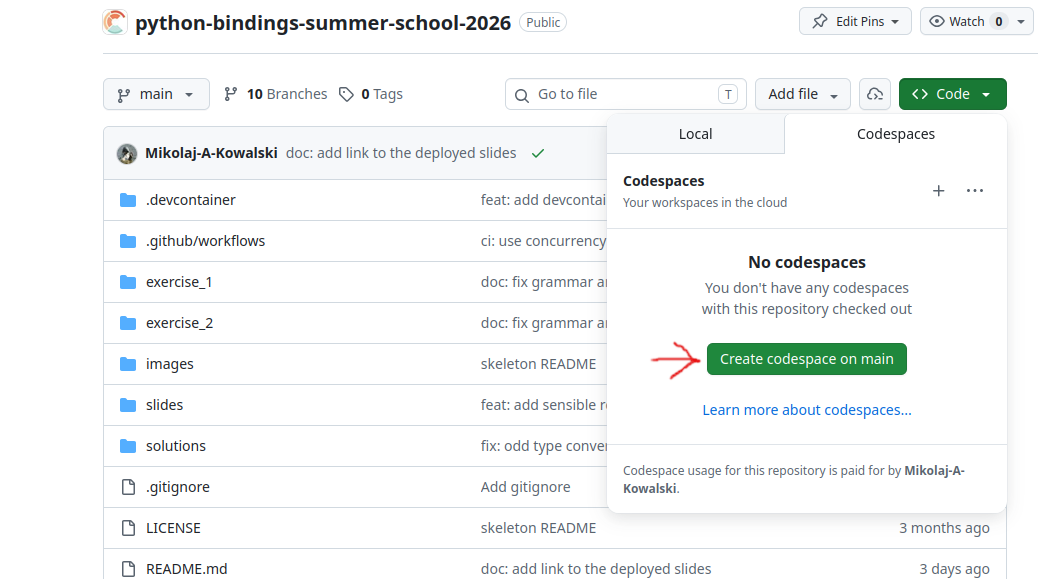
Task
Open a codespace now.
Don’t forget to delete when you are done:
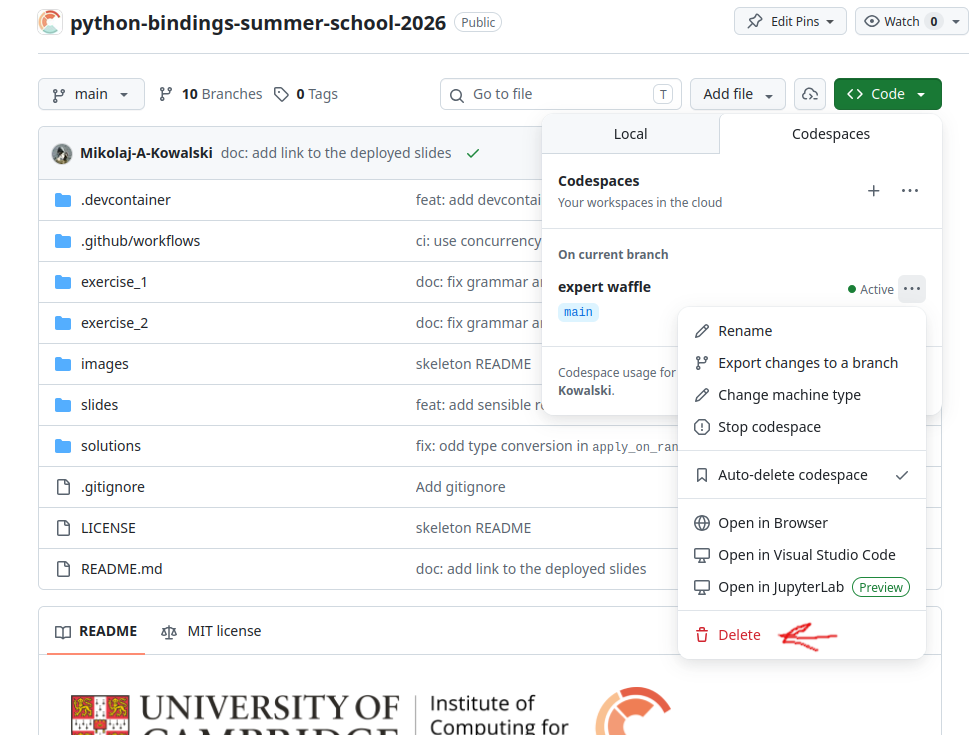
Preliminaries: Running locally
System requirements:
- Linux
- Python (3.11+)
python3 --version - CMake (3.16+)
cmake --version - C, C++, Fortran compilers e.g.
gcc --version - Python development headers (e.g.
python3-devon Ubuntu)
Running locally is the danger zone 🛦🛦🛦
Please prefer the codespace for the course. Try on your machine during miniproject or at home.
Python bindings: what do we mean?
Python
- CPython: the reference implementation of Python
- It is what you have on your machine!
- Other interpreters (e.g PyPy) have different interfaces and tools
- They are out of scope
Bindings
- A way to call code written in C, C++ or Fortran compiled into a library
- For example: PyTorch, Jax, NumPy, … and Matplotlib.
Bindings make Python a ‘glue’ between different optimised high-performance libraries.
Swimming analogy
I will be stealing an analogy (might be a spoiler for the dinner! ;-) )
“Programming is like swimming. You can only learn by doing it.”
Raw Python Extension Module
Exercise 1
In the cloned repository navigate to exercise_1 folder.
Learning Objectives
- How does Python load compiled code?
- What is a ‘Python extension module’?
- ‘Hello world’ example of Python extension module
Exercise 1: Compiling and Overview
We can build the package using the following commands:
Task
- Build the package using
pip. - Open Python and import the
punge_exmodule. - Inspect the contents with
help - Use the implemented functions
Let us go through it now together!
Try to look inside the source in src/plunge_ex.cpp and see the C++ source of the Python methods.
Don’t worry if they seem arcane. We will go through the details in a moment ;-)
Python and C functions in Python?
- Internally Python passes objects via ‘opaque’
PyObjectpointers. - Uses well documented C API to manipulate them
Pyprefixed functions
Python allows external code to plug-into the ‘built-in’ methods mechanism.
This is what ‘Python extension modules’ do!
Interlude: What is shared library?
- We don’t want to recompile Python with our extension each time.
- We need to introduce extra executable machine code at runtime stored in a separate file (⊙.☉)7
This is accomplished by shared libraries: *.so on Linux, *.dll on Windows, or *.dylib on MacOS.
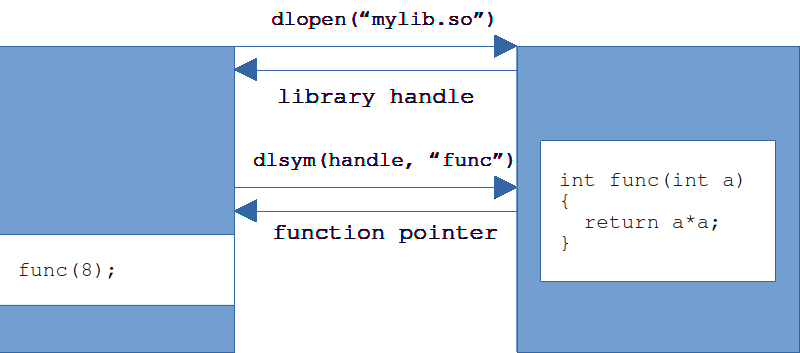
Shared libraries allow programs to load extra code at runtime. They select them ‘like’ a file and can extract functions to run
Python extension modules
‘Python extension module’ is a shared library with extra properties:
- Has a name that follows a specific convention:
<module_name>.cpython-<python_version><extra_metadata>.so- e.g.
my_mod.cpython-311-x86_64-linux-gnu.so - Conventions are defined in PEP 3149
- e.g.
- Inside the library there is a function
PyInit_<module_name>- Python will try to load it and execute on
import <module_name> - Will search for the
*.soinsys.path(like any module file) - Note that the name of the function and library file must match!
- Python will try to load it and execute on
Python 3 stable ABI
Extensions that limit themselves to a Limited Python C API are compatible with all Python 3 versions and don’t need cpython-<version> suffix (<name>.abi3.so instead).
Anatomy of an extension module
Look into exercise_1/src/plunge_ex.cpp:
At the start of the file:
These must be first lines (before any other include of C/C++ headers).
Anatomy of an extension module
At the end of the file:
We define the hook by which Python will load the module.
Caution
The name of the function must be PyInit_<module_name>, where <module_name> must match the name of the .so file! Try to break it! Rename the .so (e.g. with cp) and try to load!
Note
PyMODINIT_FUNC is a quality-of-life macro. Makes sure it works correctly with C/C++ on different systems.
Ok sure… but what goes into the PyModule_Create function?
PyModuleDef struct
Unsurprisingly, a Python structure that collects the information about the module.
// Doc: https://docs.python.org/3/c-api/module.html#c.PyModuleDef
static struct PyModuleDef plunge_ex_module_def = {
  PyModuleDef_HEAD_INIT,                                      // Magic macro that handles Python internals
  "plunge_ex",                                                   // Module name
  "\"Jump into the water of Python extensions!\" module",     // Module docstring
  -1,                                                         // Set to -1 for 'single pass initialisation'
  plunge_ex_methods,                                             // Provide list of methods module contains
  NULL,                                                       // Non null only in multi-pass initialisation
  NULL,                                                       // Function slots for deconstruction
  NULL,
  NULL
};
Note
Just try to ignore the extra fields for now! They are out of the scope for the simple example.
Note
Single pass initialisation is what we use. It may not work well with the new free-threaded Python! It is still a default for many Python binding tools.
Method list
The methods in a module are specified by a C-style array of PyMethodDef structures.
Caution
The list is null terminated with the special ‘sentinel’ value {NULL, NULL, 0, NULL}.
Python compatible C/C++ function
Required function signature depends on the calling convention.
For METH_VARARGS function must accept two pointers to PyObject (Python object descriptors).
selfis the module objectargsis a tuple of arguments passed from Python.
We can extract data from args via PyArg_ParseTuple function, format string describes contents, e.g.:
"s":single string;"ss": two strings;"f": a float
Exercise 1: Add a new function
Currently the plunge_ex module contains two functions: splash and raise_exception.
To compile and run, in the exercise_1 directory run:
Task
Create a new function multiple_splash that takes two arguments name and count and prints ‘name made a splash!’ count times.
If the count is negative, it should raise a ValueError exception.
Getting integer out of a Tuple
See ‘Numbers’ section in parsing arguments in the Python doc.
More things to try (time allowing)
- What will happen if you pass a non-integer value for
countor non-bool toraise_exception? Is the behaviour what you expected?
Why you should not write extension modules by hand
The purpose of this section was to give you a peek behind the curtain.
- Projects generally do not write raw extension modules
- Interoperability with Python is common enough that many tools were developed
- Libraries exist for popular languages (C++, Fortran, Rust, Go…)
- We can embark on a different type of swimming!

Photo by Kristina Lenberg
C++ bindings with pybind11
Intro to pybind11
Can be found on github
- Started by Wenzel Jakob at EPFL in Realistic Graphics Lab
- Widely used: PyTorch, Jax, SciPy…
- Sister nanobind library is also available
- Sacrifices some C++ support for performance
- Similar to pybind11 in API and logic
- Header-only library (don’t need to install it, just include)
- Well integrated into CMake build system
- Can use FetchContent to download it at build time
- Somewhat manual
- You define what and how to bind yourself
- No automatic generation of bindings
- Gives better control over the interface (I argue it is better)
High-level architecture overview
pybind11 uses C++ metaprogramming to allow describing bindings in a way reminiscent of Python syntax.
- When possible makes use of python keywords:
class,def - Bindings are defined incrementally:
- First we create a module
- Then we add functions and classes to it
- Hides all the gritty
Py***functions and details (you bind pure C++ directly).
C++ raw string literals
Writing well formatted Python docstrings in C++ can be a bit of a pain. Raw string literal helps a lot.
It allows to write multi-line strings that will render ‘as written’:
Building a module
int square(int x) { return x * x; }

PYBIND11_MODULE(module_name, m) {
  m.doc() = R"pbdoc(
      Docstring goes here!
    )pbdoc";

  // We can add attributes and functions with a natural syntax
  m.attr("__version__") = "0.1.0";

  // We take an address of function when we bind them
  // py:arg allows us to specify the name for arguments
  m.def("square", &square, "Function docstring", py::arg("x"));

  // Not necessary but we can delegate to functions to bind classes/sets of functions
  // Keeps things clean
  bind_particular_class(m);
}- pybind11 gives us a macro that builds up the
PyInit_module_namefunction. - We can add attributes and functions to the module with a natural syntax.
docmethod to access docstringattrmethod to access attributesdefmethod to define functions
pybind11 header system
pybind11 has a modular header system. To enable extra features you need to include extra headers:
- Reduces compilation time by using only necessary code
- Generally gives sensible error messages, i.e.: “Have you forgotten to include …?”
Automatic conversions
pybind11 aims to be as seamless as possible:
- It will silently convert types between C++ and Python
- Most of the time it will not matter…
- … but sometimes it will.
- Copies can be heavy for large objects (e.g. long lists of strings)
Automatic conversions
There be dragons: mutable references
In Python:
Not quite the result we expected…
Exercise 2: Task 1
You will find a familiar splash and raise_exception functions inside the exercise_2/src/plunge_pyb.cpp file!
The extension module name is plunge_pyb, to compile and run:
Task
Once again create a new function multiple_splash that takes two arguments name and count and prints ‘name made a splash!’ count times.
If the count is negative, it should raise a ValueError exception.
Exception translation
pybind11 converts thrown C++ exceptions to different Python exceptions. Consult the translation table to know what to raise on C++ side.
Please ignore ‘Task 2’ parts for now ツ
STL containers
We bind in C++ with:
In Python we can use like:
Spot the issue with this example?
We could have written std::vector<int>! We take a reference of a temporary copy.
This problem is deadly for scientific workflows (╯°□°)╯︵ ┻━┻
Array compatibility
Python and pybind11 have solutions to this problem ┬─┬ノ( º _ ºノ)
- The buffer protocol (Python standard)
- Will not be covered here.
- pybind11 has a built-in
py::arraytype that is compatible withnumpy.ndarray- We will use it in the exercises
- pybind11 has similar support for the
EigenC++ library
pybind11 py::array_t
Subset of functionality needed for the exercises:
#include <pybind11/numpy.h> // <- Enables Numpy interoperability
...

py::array_t<double> my_array = py::array_t<double>(10); // 1D array of 10 doubles

my_array.mutable_at(0) = 3.14; // Mutable access to an element
auto b = my_array.at(0);       // Immutable access to an element

...
// You can accept it as an argument to a function
void my_function(py::array_t<double> arr) {
  arr.size() // You can query the size
  ...
}
Note
This should be all you need for the exercise later on.
Callbacks
pybind11 supports std::function and accepts Python functions as arguments!
Exercise 2: Task 2
Once again we have two functions written for reference: print_numpy_array and apply_on_range that demonstrate the use of py::array_t and callback via std::function.
Compile and run:
Task
Implement a new function interpolate that takes a py::array_t<double> and a std::function<double(double)> as arguments and returns a new py::array_t<double> with the function applied to each element of the input array.
Return either std::vector<double> or py::array_t<double> from the function. Choose your favourite (or do both!).
Example signature:
pybind11 summary
Not covered:
- Binding classes
- Parallelism (multi-threading, MPI)
- More on array interoperability (buffer protocol, Eigen)
Takeaway message
Binding C++ to Python is possible and ultimately not that hard.
Epilogue
What about Fortran?
Since Fortran is a language with less ‘industrial’ interest support is limited:
f2pyinterface generator, part of numpy- Tailored for older Fortran 77 libraries (but supports Fortran 90)
- Lacks support for modern features
- ISO C interoperability (Fortran 2003)
- Fortran can call C and vice versa
- You can write a C wrapper for your Fortran code and then use pybind11 to bind the C wrapper
Other useful tools and methods
- SWIG (Simplified Wrapper and Interface Generator)
- Boost.Python
- Inspiration for pybind11
- Python ctypes
- Foreign function interface for Python
- Cython
- Python to C compiler
- Adds language extensions for foreign code
- CFFI library
And many more that I have missed…
Takeaways
- Python has a standardised and well described way to plug your compiled code
- You are not expected to write extension modules by hand
- One can rely on dedicated libraries e.g.
pybind11in C++
- One can rely on dedicated libraries e.g.
- It is not that hard!
- Sometimes when you wish you to ‘just write a loop’… you can!
- You can plug your code into the rich, interoperable Python ecosystem
Thank you for your attention!

Python Bindings | ICCS Summer School 2026